My second extension for Mozilla Firefox causes other open bookmark and history folders to close themself, when you open a new one in the sidebar. To do so, simply click on the folders name. If other open folders should not close themself, than use the ± to open/close a folder.
English (en-US), German (de-DE), es-ES, ja-JP, pt-BR, pt-PT, sr, Tr, zh-CN, pl, it, uk-UA
0.7.2
improved: Firefox 42+ support
0.7 / 0.7.1
improved: Firefox 34 support
added: new language uk-UA
0.6.2.2
bump max version to 11.*
updated some language files (es-ES, ja-JP, pt-PT)
0.6.2.1
updated some language files (sr, tr, pt-BR, zh-CN)
0.6.2
new languages: pl, it
fixed: updating from 0.6c to 0.6 leads to missing toolbar and not-working settings dialog if the option to close the sidebar was enabled [reported by John Thornburgh]
0.6
fixed: open/close all buttons not working until mouse moved over bookmark/history item
new option to display toolbar buttons as buttons with text, icon+text, icon-only
new option to close sidebar after opening on a bookmark/history item (left click only)
0.6c
fixed: unknown entity in pref dialog for some languages
0.6b
added new language ja-JP
new way for closing the folders (improves compatibility)
now follows AMO guidelines by using namespace and other things
dropped Firefox 4.0 suppor
0.6a
Firefox 4.0 support
dropped Firefox 2/3 support
added new language zh-CN
0.5.6.2, 0.5.6.3
improved compatibility with upcoming version of BMB
added new language sr-RS
0.5.6.1
Firefox 3.6 (Alpha) support
added new languages es-ES, pt-PT, tr-TR
0.5.6
added: option to close all open folders when closing the sidebar
fixed: middle click on folder did not open all containing bookmarks [reported by Philippe]
fixed: closing a folder inside the bookmarks sidebar using the ± icon could open a bookmark, that would be on the position (height) of the folder [reported by Erwin]
removed: Firefox 1.5 support
0.5.5.5
fixed: make it work again with Firefox 3.0b4
fixed: scrolling bug, when "Remember and focus last selected folder" was enabled, where top of the sidebar content was not visible (introduced in 0.5.5.3)
0.5.5.3
fixed: added delay for selecting the last opened folder to make it work with Firefox 3.0
added new language sk-SK
0.5.5.2
fixed: restored compatibility with tab-extensions and other (such as Boox)
0.5.5.1
fixed: no new tab for bookmarks whith Tab Mix Plus
0.5.5
better Firefox 3.0 (Alpha) support
removed Firefox 1.0 support
some minor code changes/clean-ups
0.5.4
added Firefox 3.0 (Alpha) support
added option to close sidebar when closing firefox
added new language zh-CN
added: button to open settings (next to the close-sidebar button); add thhis css-code to your userChrome.css, to hide the button #browser > #sidebar-box * #acbtf_Settings { display:none; }
0.5.3.4
added new languages da-DK, nl-NL, pt-BR and pt-PT
0.5.3.3
added: Firefox 2.0 support
0.5.3.2
fixed small bug in pl-PL locale (error in pref_dialog.xul)
0.5.3.1
added new languages fr-FR, it-IT, es-ES, pl-PL, tr-TR, ko-KR
0.5.3
fixed: Firefox 1.0 (error caused by character encoding)
version bump for compatibility with Firefox 2.0 TRUNK builds
0.0.5
added: new small toolbar with two buttons to close and open all folders (note: opening all could take a long time)
added: italian language support, translation by Giuliano Masseroni from extenzilla.it
0.0.4.1
fixed: no history visible, when folder is remembered and history was cleared
fixed error in settings dialog
0.0.4
added: new options dialog
added: remember the last scroll position (folder) of the sidebar after closing and reopening
0.0.3
fixed error in history panel with TRUNK builds
Delete Bookmark Icons *UPDATED*
current version: 0.7.1 from 21/1/2016
With Delete Bookmark Icons you are able to delete the icon of just one or all of your bookmarks.
The reason why I made this extension is that, that Mozilla Firefox sometime overrides the icon of a bookmark with another one, which does not belongs to this side and the only way to get to right icon back, is to delete the bookmark and make a new one for this web side. There's an end of it! Rightclick on the bookmark whose icon shall be deleted and select Delete Site Icon(s). With the bookmark manager you can delete the icons of all of your bookmarks by selecting Delete All Site Icons from the Edit menu.
English (en-US), German (de-DE), es-ES, nl, pl, sr
0.7.1
improved: Firefox 44+ support
0.7
improved: Firefox 42+ support
0.6
version for Firefox 37+
added: options dialog for "extensions.DeleteBookmarkIcons.hideToolbarIcon" and "extensions.DeleteBookmarkIcons.hideToolbarIcons"
added: option "extensions.DeleteBookmarkIcons.hideToolbarIcon" to hide the default bookmark icon on the toolbar (on by default)
improved: compressing the database no longer blocks the browser
0.5.5
fixed: deleting the icon from an history entry did not work
more internal changes
0.5.4
version for Firefox 30
added: default favicon (the "blank square") will be hidden on the bookmarks toolbar
added: (hidden) option "extensions.DeleteBookmarkIcons.hideToolbarIcons" to completely hide all bookmark icons on the toolbar (off by default)
0.5.3
version for Firefox 20 and it's new per-window private browsing feature
update hu-HU locale
0.5.2
new language: ar
0.5.1
new languages: fr, hu-HU
0.5
initial Version for Firefox 5 and newer
support Private Browsing mode
remove backup files on uninstall
(hidden) option to configure max. number of backup files (5 by default; -1 => no limit; 0 => off)
dropped support for Firefox 3.6
0.4.2
fixed: language files of es-ES and sk-SK contained invalid entities
added new language hu-HU
0.4.1
updated locale description and converted .properties to .dtd
0.4
fixed: context menu command disabled in Firefox 3.6
added 3 new languages (ro-Ro, ga-IE, et-EE)
removed Firefox 3.5 support
0.3.6
fixed: assignment to undeclared variable
0.3.5
added: Firefox 3.5/3.6 support
added new languages
fixed: some locales where missing
more robust and efficient code
0.3
added: Firefox 3.0 support
added new languages cs-CZ (Czech), ar (Arabic)
0.2.2
added new languages fi-FI, ja-JP, sv-SE
0.2.1
fixed: corrupt context menu in Bookmarks Manager (no 'Delete Site Icon(s)' and 'Properties')
0.2
added Firefox 3.0a1 support
added new languages be-BY, ca-AD, da-DK, nl-NL, pt-BR, pt-PT, zh-CN, zh-TW
0.1.2
fixed: Bookmark bundle cmd_bm_deletefavicon_accesskey not found
added new languages ru-RU and uk-UA
0.1.1
added new languages fr-FR, it-IT, es-ES, pl-PL, sk-SK, tr-TR, ko-KR
Clear Form History *UPDATED*
current version: 0.5.1 from 21/1/2016
With Clear Form History you can delete all saved entries of a specific text-field. There is no need anymore to use SHIFT+ENTF and delete all items one by one!
version for Firefox 20 and it's new per-window private browsing feature
0.4
version for Firefox 5 and 6
0.3
disable command when in Private Browsing mode
disable backups by default. Whenever "noBackups" is set to true (default), any previously created backup files will be deleted.
delete backup directory when Clear Form History gets uninstalled
0.2
added Firefox 3.5/3.6 support
Bookmarks Menu Button *UPDATED*
current version: 0.6.1 from 23/2/2010
Bookmarks Menu Button (BMB) adds a new bookmarks and history menu button to the toolbar. Those combine all the functunality of the normal bookmarks/history button and the bookmarks menu. In addition, you can define how to sort your bookmarks, reorder the history, open/close the bookmarks/history sidebar or restore the last closed tab/window (Firefox 3.5) either using the middle or the right mouse button.
At the Mozillazine Forum you can find a thread about BMB Extension containing the changelogs, bugs and other things related to my extension.
known issue: "sort now" function won't work in Fx 3.6; you can use the advanced sort menu instead
added: menu for unfiled bookmarks and tags underneath the menu for the bookmarks toolbar; all three menus can be turned off!
0.6b2
fixed: missing dropmarker in Firefox 3.5 when moving a bookmark
improved: updated sort algo
added: bookmarks button opens after after a short time when dragging an item over it, to place the item at a position of your choice (like the default bookmarks menu)
0.6b1
added Firefox 3.5 support
new bookmarks and history tab
0.5b1
added full Firefox 3.0 support
bumped Qute to version 3.3.1
fixed minor issue when opening a bookmark using middle-click
0.4.3.6
know issue: if you use Menu Editor, than do not change the bookmarks menu
added new language Swedish (sv-SE)
bumped Qute to version 3.3.1
fixed minor issue when opening a bookmark using middle-click
0.4.3.4
know issue: if you use Menu Editor, than do not change the bookmarks menu
fixed: sorting from the sort-menu did not respected the sort-prefs (ignored exclude toolbar and sort recursive)
fixed: minor issue in history-menu after BMB has been installed and Firefox restarted using the extensions manager
0.4.3.3
know issue: if you use Menu Editor, than do not change the bookmarks menu
added new language chinese traditional (zh-TW)
added: option to clear the list of recently closed tabs
added: favicon for closed tab
0.4.3.2
know issue: if you use Menu Editor, than do not change the bookmarks menu
fixed: feedMenupopup has no properties error with Firefox 1.5
0.4.3
know issue: if you use Menu Editor, than do not change the bookmarks menu
added new languages el-GR, es-ES, fr-FR, it-IT, nl-NL, pl-PL, pt-BR, ru-RU and zh-CN
fixed: tabs where not restored correctly
improved: removed delay when opening the history button for the first time
partial fixed: if you do not have a file named classic.jar in the chrome of Firefox (like Ubuntu users), than add the following line to your profile's userChrome.css to get the icons for the buttons back @import url("chrome://bmb-ext/skin/bmb_nojar.css");
0.4.2.2
know issue: if you use Menu Editor, than do not change the bookmarks menu
fixed: no symbols for the buttons, if an unsupported theme was used
0.4.2
know issue: if you use Menu Editor, than do not change the bookmarks menu
added full Firefox 2.0 support
added option to remove drop markers (arrows) next to the buttons
added option to restore last closed tab via right/middle click on the history button (Firefox 2.0 only)
added shortcut key for the history button (same as the normal history menu)
removed: Firefox 1.0 support
Qute 3 is now the default version of Qute 2; if you use Qute 2, add the following line to your userChrome.css @import url("chrome://bmb-ext/skin/bmb-ext_qute2.css");
0.4.1
know issue: if you use Menu Editor, than do not change the bookmarks menu
added new languages es-ES, fr-FR, it-IT, pl-PL, pt-BR, ru-RU and zh-CN
0.4
*think of a long list here*
0.3.1
know issue: if you use Menu Editor, than do not change the bookmarks menu
improved: orig. bookmarks menu can be used together again with BMB (but still hidden by default)
fixed issues with extension Compact Menu
0.3
know issue: if you use Compact Menu, then uncheck the bookmarks
added Firefox 1.5 support
added history button
added: sorting bookmarks via context menu
added: choose actions for right and middle click on bookmarks button
improved overall Firefox support
fixed: problem (empty menuitem) with extension Sort Bookmarks
other minor improvements
0.2.3.2005012802
know issue: if you use Compact Menu, then uncheck the bookmarks
fixed: default nav-bar context menu is disabled now, when the right-click function is enabled
fixed: settings dialog was not resizeable when opened via extension manager
fixed: miniT problem
fixed: sometimes menu was not closed
fixed: settings dialog not resizeable
added spanish language support, translation by Karius (alt. link)
added italian language support, translation by Madman from extenzilla.it
added shortcut for the button; will be the same like the one for the old bookmarks menu which is ALT+B (en-US) and ALT+L (de-DE)
bookmarks can be moved/reorderd now
old bookmarks menu will be hidden when BMB is used and vice versa
on first install/use it will ask, if BMB should be added to the navbar
Linux users with default theme (Pinstripe); add the following line to your userChrome.css @import url("chrome://bmb-ext/skin/bmb-ext_pin.css");
0.2.2
hotfix for Qute3 theme support; add the following line to your userChrome.css, if you use Qute3 @import url("chrome://bmb-ext/skin/bmb-ext_qute3.css");
3DCenter NavMenu *UPDATED*
current version: 0.2 from 22/3/2011
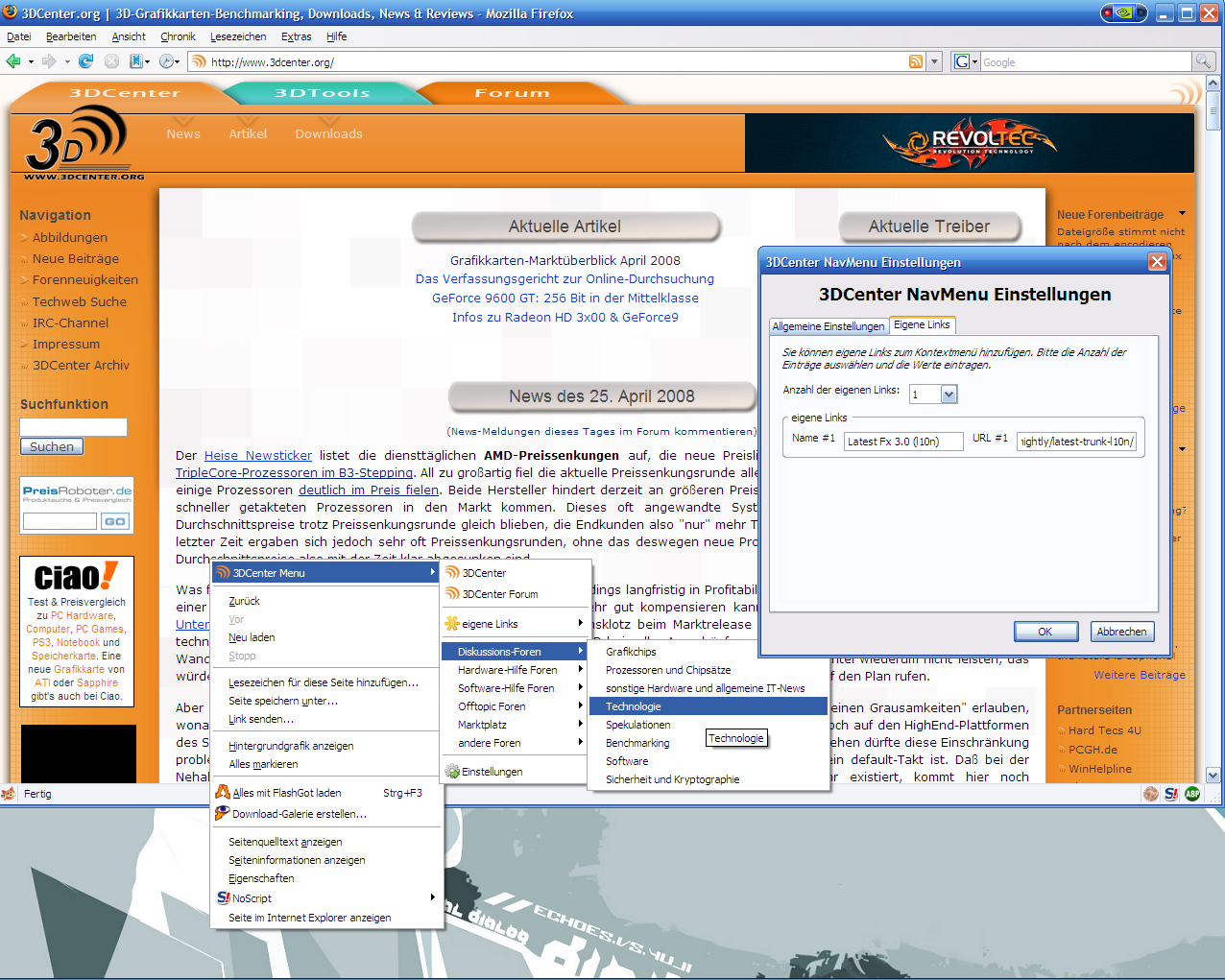
3DCenter NavMenu adds a new menu ti the browser's context menu, from where you can access alomst all forums of the 3DCenter Forums. In addition you can add up to 30 custom links too.
added: icon to indicate locked forums (means read-only for unregistered users)
added: Firefox 3.5/3.6 support
added: Flock 2.0 support
fixed: dialog not scrollable with many custom links
0.1.7.6
updated Logos to reflect the new design of 3DCenter.org
0.1.7.5
added: Flock 1.1 support
fixed: open in new tab/window was ignored, when you opened a forum and where currently visiting the 3DCenter forum
0.1.7.4
updated forums
use the same TLD as the current forums url for the forums from the menu
made extension compatible with new requirements for extensions in Firefox 3.0 (secure updates)
0.1.7.3
updated forums
0.1.7.2
updated forums: new software discussion forum; the forum for TCPA and Palladium was transformed into a security and cryptography forum; english forum gone
0.1.7
added option to override 'open in' using the shift key
fixed: custom links where not shown/restored correctly, if you set the amount of links to a lower value than before
0.1.6.2
add new forum 'Netzwerke, Internet und Telekommunikation'
0.1.6.1
updated forums (new forum for Gothic)
0.1.6
improved: "force open in current tab/window if 3DCenter forum is the current active website": only works with forum-3dcenter urls and if the current page is empty (about:blank)
fixed: forums where not opened properly in recent Firefox 2.0b1 builds
0.1.4
added: Flock 0.7.1 support
added option to open links in the current window/tab, if the current site is a 3dcenter-forum site and if links generally should open in a new tab/window
updated forums
0.1.3
added Firefox 2.0 support
fixed: name of the English Forum was lowercase
0.1.2
fixed: no dropdown arrow to select number of custom links under linux
fixed: wrong link for the PC-Spiele sub-forum
Miscellaneous
Set Flash Quality Greasemonkey-Script
Sets the quality of all embeded Flash-Animations to "low".
View(Greasemonkey required for installation)
BBCode 3DCenter Special Editon 0.4.1.7
With the permisson of Jed Brown, I modified his BBCode by adding additional BBCodes, where some of them are especially for the 3DCenter forums.
Install(for Firefox 1.0-3.6, Mozilla 1.0-1.8, SeaMonkey 1.0-1.5 and Flock 0.5-1.0)